

- Sep 9, 2026
- 102
- 1,483
Video Downloader below; Uploader scripts in a post below
I'm sure you've seen many sites that disallow video downloads. And while many plugins exist for browsers, most of them don't work on certain sites. This script certainly isn't universal, but it should work on many of them. Needs testing however, if you find a site it doesn't work on let me know. This script requires you to install Python on your computer, though you don't need to understand how to use it. You also need Tampermonkey extension or the equivalent.
For testing on my part I focused on ACG, Bilibili and Aibooru (and youtube), though other booru boards should work too. Image downloads should work as well. Setting it up is the hardest part:
Setup:
1) Download Python Install Manager. Install with default settings.
2) Download ffmpeg. Essentials is enough. Extract ffmpeg and ffprobe.exe next to the python script. This folder is where your downloads go to. The script should install ffmpeg on it's own so you can try skipping this part, but probe may be needed on some sites.
3) Download the attached scripts.zip. Extract the video_server.py to a folder where you want to download your media to.
3) Install Tampermonkey or equivalent. Tampermonkey is not open source so consider alternatives like Violentmonkey.
4) Open the extension and click + to add a new script, and Add from file... Use the script attached in the zip file. Or just create new script and copy/paste the contents of the script into the editor.
6) (Optional) Open command line and run "winget install DenoLand.Deno" without quotation marks. This part is not needed if you do not want to DL from Youtube.
To be inclusive of most sites, and allow DRM-protected media to be downloaded, Python is practically mandatory, so I cannot bundle the script and python into a standalone plugin. If you need help feel free to ask. I hope this script helps at least someone. It was talked about briefly in a different thread and I'll tag the users here: @Rinkawa @sugoinu
Also @Checkmate in case you find that this could be stickied or placed somewhere else for better visibility.
I don't know anything about linux/macOS but if you can install python there, they should work all the same.
How to use:
On computer, double-click video_server.py, allow network access if asked. If everything goes okay, your window should look like so:
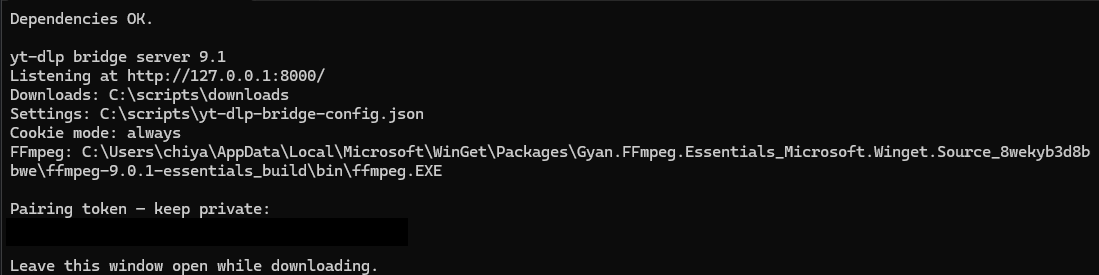
Copy your pairing token from here.
On browser, with script enabled, go to any site with media. On top right, click the Tampermonkey or equivalent button, and click "Allow this site". Also copy/paste your pairing token into it's own setting. To test, just use ACG/Aibooru/Bilibili. The select post feature is exclusive to ACG/Booru boards, need to manually add other sites so request if you know any important ones.
If everything works, you should see the DL button on bottom right. Use the config first and setup your browser. To ensure 100% functionality, forcing browser cookies is recommended unless you don't use cookies. The absolute profile path is the ROOT of your profile folder, write about:config to address bar to find it. However, this shouldn't be needed on standard browsers, but I needed it on LibreWolf.
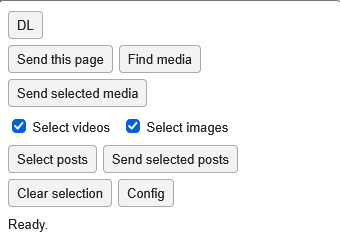
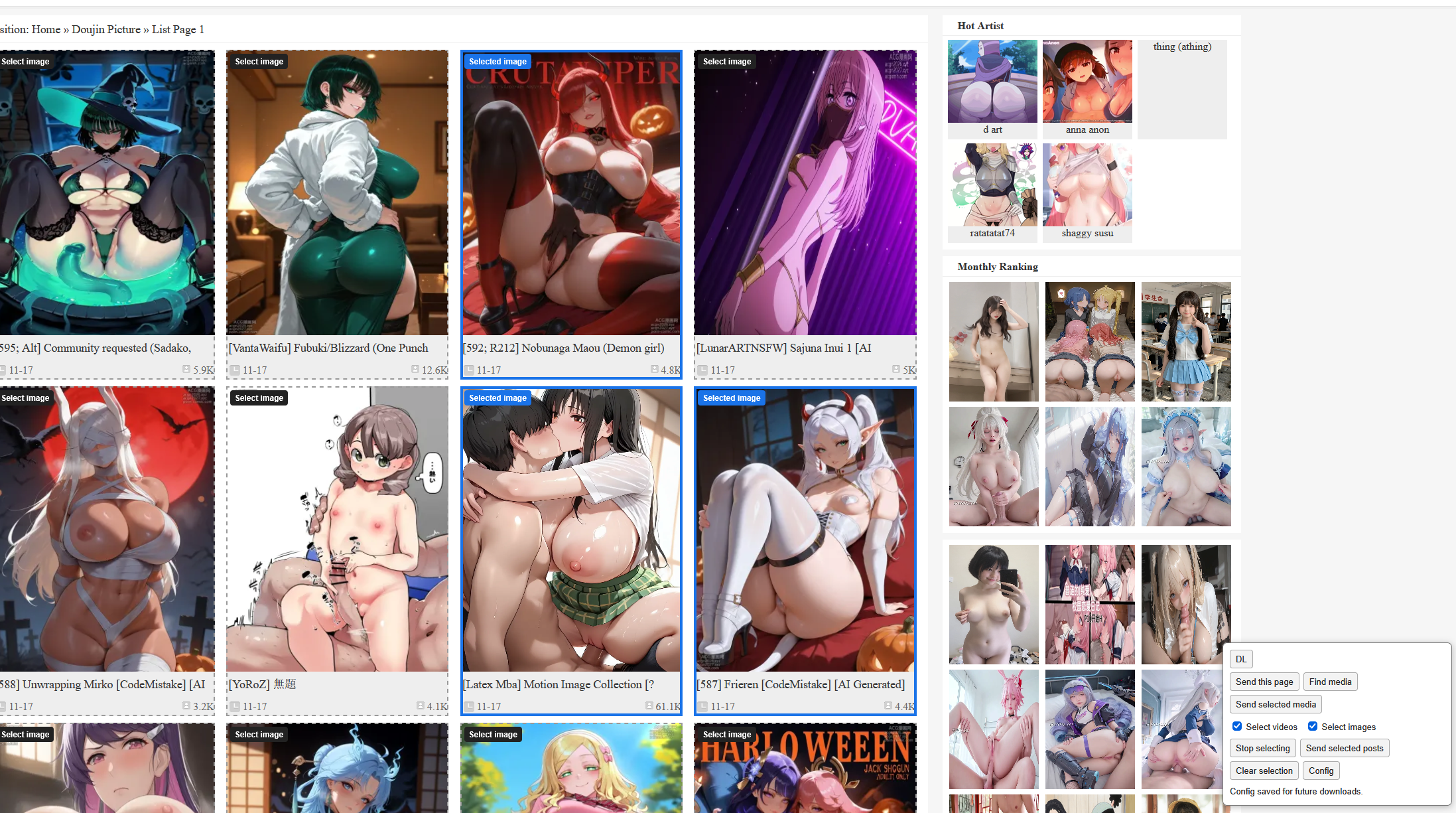
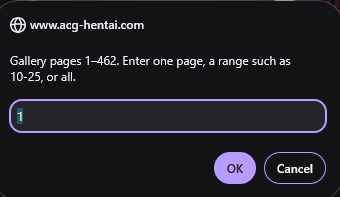
Select which type of posts you want, or leave both selected. Then click Select posts, which changes your web page look: You can also click Send this page to send everything, but I haven't tested this in a full gallery. Sending the whole page may be required on some sites as Bilibili. If a post is a gallery, the web page will prompt for the pages you wish to download. You may select multiple galleries at once, each will give it's own prompt. (Western tab at the top doesn't work atm because chapters make it cringe).
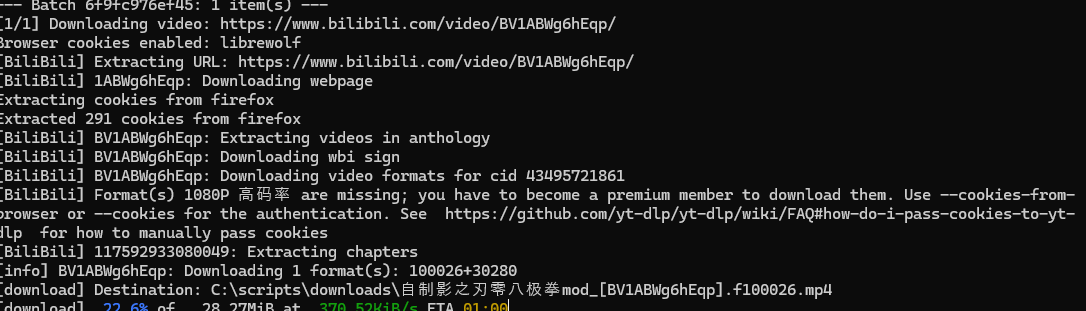
If it works, cmd line shows progress: (This is from bilibili)
If not, it'll report errors there.
I'm sure you've seen many sites that disallow video downloads. And while many plugins exist for browsers, most of them don't work on certain sites. This script certainly isn't universal, but it should work on many of them. Needs testing however, if you find a site it doesn't work on let me know. This script requires you to install Python on your computer, though you don't need to understand how to use it. You also need Tampermonkey extension or the equivalent.
For testing on my part I focused on ACG, Bilibili and Aibooru (and youtube), though other booru boards should work too. Image downloads should work as well. Setting it up is the hardest part:
Setup:
1) Download Python Install Manager. Install with default settings.
2) Download ffmpeg. Essentials is enough. Extract ffmpeg and ffprobe.exe next to the python script. This folder is where your downloads go to. The script should install ffmpeg on it's own so you can try skipping this part, but probe may be needed on some sites.
3) Download the attached scripts.zip. Extract the video_server.py to a folder where you want to download your media to.
3) Install Tampermonkey or equivalent. Tampermonkey is not open source so consider alternatives like Violentmonkey.
4) Open the extension and click + to add a new script, and Add from file... Use the script attached in the zip file. Or just create new script and copy/paste the contents of the script into the editor.
6) (Optional) Open command line and run "winget install DenoLand.Deno" without quotation marks. This part is not needed if you do not want to DL from Youtube.
To be inclusive of most sites, and allow DRM-protected media to be downloaded, Python is practically mandatory, so I cannot bundle the script and python into a standalone plugin. If you need help feel free to ask. I hope this script helps at least someone. It was talked about briefly in a different thread and I'll tag the users here: @Rinkawa @sugoinu
Also @Checkmate in case you find that this could be stickied or placed somewhere else for better visibility.
I don't know anything about linux/macOS but if you can install python there, they should work all the same.
How to use:
On computer, double-click video_server.py, allow network access if asked. If everything goes okay, your window should look like so:
Copy your pairing token from here.
On browser, with script enabled, go to any site with media. On top right, click the Tampermonkey or equivalent button, and click "Allow this site". Also copy/paste your pairing token into it's own setting. To test, just use ACG/Aibooru/Bilibili. The select post feature is exclusive to ACG/Booru boards, need to manually add other sites so request if you know any important ones.
If everything works, you should see the DL button on bottom right. Use the config first and setup your browser. To ensure 100% functionality, forcing browser cookies is recommended unless you don't use cookies. The absolute profile path is the ROOT of your profile folder, write about:config to address bar to find it. However, this shouldn't be needed on standard browsers, but I needed it on LibreWolf.
Select which type of posts you want, or leave both selected. Then click Select posts, which changes your web page look: You can also click Send this page to send everything, but I haven't tested this in a full gallery. Sending the whole page may be required on some sites as Bilibili. If a post is a gallery, the web page will prompt for the pages you wish to download. You may select multiple galleries at once, each will give it's own prompt. (Western tab at the top doesn't work atm because chapters make it cringe).
If it works, cmd line shows progress: (This is from bilibili)
If not, it'll report errors there.

