
Install the app
How to install the app on iOS
Follow along with the video below to see how to install our site as a web app on your home screen.
Note: This feature may not be available in some browsers.
You are using an out of date browser. It may not display this or other websites correctly.
You should upgrade or use an alternative browser.
You should upgrade or use an alternative browser.
- Status
- Not open for further replies.


- Apr 7, 2024
- 325
- 641

- Jul 8, 2013
- 43
- 35
I don't know if I can post the link outside the forum? But you can find the download link on this page:
https://romslab.com/9-r-i-p-sequel-switch-xci-free-download/
https://romslab.com/9-r-i-p-sequel-switch-xci-free-download/

- Sep 1, 2025
- 1,902
- 2
- 12,240
Hopefully it can be reuploaded somewhere that isnt limited speed. ;-; 24kb/s is tortureI don't know if I can post the link outside the forum? But you can find the download link on this page:
https://romslab.com/9-r-i-p-sequel-switch-xci-free-download/

- Sep 26, 2025
- 215
- 550
Totally!!! ToT if anyone has a different link (that is NOT locked behind a paywall...) it would be very useful!Hopefully it can be reuploaded somewhere that isnt limited speed. ;-; 24kb/s is torture

- Jul 28, 2024
- 1,483
- 1
- 10,550
Hopefully it can be reuploaded somewhere that isnt limited speed. ;-; 24kb/s is torture
I've uploaded it for you on Buzzheavier. I hope you can get it now!Totally!!! ToT if anyone has a different link (that is NOT locked behind a paywall...) it would be very useful!
You must give the following reaction to unlock: 
- Sep 26, 2025
- 215
- 550
Thank you!!!I've uploaded it for you on Buzzheavier. I hope you can get it now!
[Hidden content]
- Sep 26, 2025
- 215
- 550
I made it work (somewhat) on eden with the 20.3.0 firmware. The game crashes at random times, but if I start it again and load my latest save I can keep going past the crashing points with no issue... until it crashes again, but I just keep restarting it over and over and I haven't been unable to continue so far. It's been a matter of just saving frequently and restarting the game for me!Is there a minimum firmware needed for this? Not seeing it on my game list for either Yuzu or Ryujinx despite being in the game folder. Though I wouldn't be surprised if it was something else lol.

- Jan 19, 2014
- 84
- 610
Is there a minimum firmware needed for this? Not seeing it on my game list for either Yuzu or Ryujinx despite being in the game folder. Though I wouldn't be surprised if it was something else lol.
The minimum firmware needed is 19.0.0.0 but I'd recommend updating your keys to a more recent version anyways if newer games aren't showing up.

- Sep 1, 2025
- 1,902
- 2
- 12,240
https://multiup.io/en/mirror/02f3675c67d43d3c0f826847c56e316b Other links just in case
Did you manage to make the game show up? I have the 19.0.0.0 firmware in Ryujinx and it's not showing up or working at all ;~;Is there a minimum firmware needed for this? Not seeing it on my game list for either Yuzu or Ryujinx despite being in the game folder. Though I wouldn't be surprised if it was something else lol.

- Aug 27, 2014
- 149
- 1,885
Thank you for all the replies!
@boopie I did not, Switch games might now be at the point where we have to swap to another emulator sadly. Still keeping these of course to get through and play my backlog, but if anyone has recommendations for us we should maybe try them out. It will be quite a while before we have a Switch 2 emulator as good as Yuzu/Ryujinx are and were.
@orionsbestie Thank you for the lead! As soon as I'm caught up on Fields of Mistria I'll likely try Eden out. Is it the same setup as the other emulators?
@sinovu Thank you for this info. One is on 19.0.0.0 and the other 18.0.0.0, but it didn't appear on either sadly - even as a ? cartridge, which is usually the indicator you need to update firmware for a game. Looks like it's time for a third emulator sadly.
@boopie I did not, Switch games might now be at the point where we have to swap to another emulator sadly. Still keeping these of course to get through and play my backlog, but if anyone has recommendations for us we should maybe try them out. It will be quite a while before we have a Switch 2 emulator as good as Yuzu/Ryujinx are and were.
@orionsbestie Thank you for the lead! As soon as I'm caught up on Fields of Mistria I'll likely try Eden out. Is it the same setup as the other emulators?
@sinovu Thank you for this info. One is on 19.0.0.0 and the other 18.0.0.0, but it didn't appear on either sadly - even as a ? cartridge, which is usually the indicator you need to update firmware for a game. Looks like it's time for a third emulator sadly.

- Feb 15, 2023
- 186
- 87
Citron & ryubing released a new release today, maybe it well help?Thank you for all the replies!
@boopie I did not, Switch games might now be at the point where we have to swap to another emulator sadly. Still keeping these of course to get through and play my backlog, but if anyone has recommendations for us we should maybe try them out. It will be quite a while before we have a Switch 2 emulator as good as Yuzu/Ryujinx are and were.
@orionsbestie Thank you for the lead! As soon as I'm caught up on Fields of Mistria I'll likely try Eden out. Is it the same setup as the other emulators?
@sinovu Thank you for this info. One is on 19.0.0.0 and the other 18.0.0.0, but it didn't appear on either sadly - even as a ? cartridge, which is usually the indicator you need to update firmware for a game. Looks like it's time for a third emulator sadly.
I would love to download the game and test it, but unfortunately I cant right now.

- Jul 11, 2024
- 175
- 183
Thank you for all the replies!
@boopie I did not, Switch games might now be at the point where we have to swap to another emulator sadly. Still keeping these of course to get through and play my backlog, but if anyone has recommendations for us we should maybe try them out. It will be quite a while before we have a Switch 2 emulator as good as Yuzu/Ryujinx are and were.
@orionsbestie Thank you for the lead! As soon as I'm caught up on Fields of Mistria I'll likely try Eden out. Is it the same setup as the other emulators?
@sinovu Thank you for this info. One is on 19.0.0.0 and the other 18.0.0.0, but it didn't appear on either sadly - even as a ? cartridge, which is usually the indicator you need to update firmware for a game. Looks like it's time for a third emulator sadly.
I hope my experience helps you: use the Ryujinx-Ryubing emulator with keys v20.3.0 and firmware 19.0.1. This method worked for me - the game launched without any issues and runs smoothly. Just like all the other new games as wellDid you manage to make the game show up? I have the 19.0.0.0 firmware in Ryujinx and it's not showing up or working at all ;~;
- Jul 28, 2024
- 1,483
- 1
- 10,550
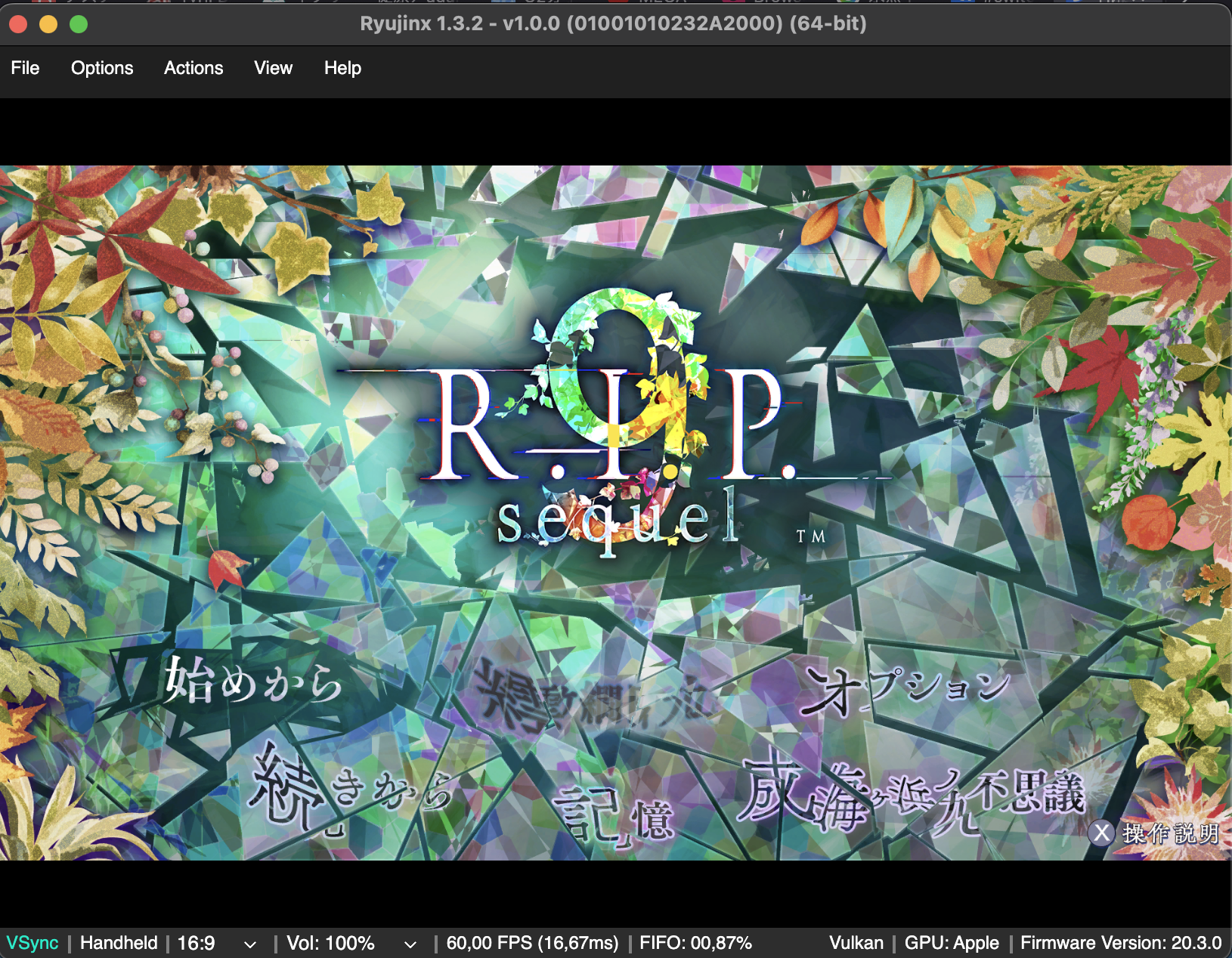
Not sure why it doesn't work for yall...? Ryubing 1.3.2, firmware 20.3.0 and it's working pretty well for me. Don't forget to not get the least of the requirements but always take the latest released firmware, on emulator if needed (although I don't get why you'd need to do that) you can downgrade at any moment.
- Jul 11, 2024
- 175
- 183
That's right, but for me it works steadily on the old firmware version, just with the new keys, because I have a different build for which the new version didn't fit for some reason. So it turned into a kind of FrankensteinNot sure why it doesn't work for yall...? Ryubing 1.3.2, firmware 20.3.0 and it's working pretty well for me. Don't forget to not get the least of the requirements but always take the latest released firmware, on emulator if needed (although I don't get why you'd need to do that) you can downgrade at any moment.View attachment 80014
- Sep 26, 2025
- 215
- 550
I tried @Shanice 's suggestion and it works perfectly, though I don't know why I had to set up the emulator twice before it worked... I'd recommend trying it out as well!Thank you for all the replies!
@boopie I did not, Switch games might now be at the point where we have to swap to another emulator sadly. Still keeping these of course to get through and play my backlog, but if anyone has recommendations for us we should maybe try them out. It will be quite a while before we have a Switch 2 emulator as good as Yuzu/Ryujinx are and were.
@orionsbestie Thank you for the lead! As soon as I'm caught up on Fields of Mistria I'll likely try Eden out. Is it the same setup as the other emulators?
@sinovu Thank you for this info. One is on 19.0.0.0 and the other 18.0.0.0, but it didn't appear on either sadly - even as a ? cartridge, which is usually the indicator you need to update firmware for a game. Looks like it's time for a third emulator sadly.
- Jul 11, 2024
- 175
- 183
I'm very glad that everything worked out for you!I tried @Shanice 's suggestion and it works perfectly, though I don't know why I had to set up the emulator twice before it worked... I'd recommend trying it out as well!
- Aug 27, 2014
- 149
- 1,885
I hope my experience helps you: use the Ryujinx-Ryubing emulator with keys v20.3.0 and firmware 19.0.1. This method worked for me - the game launched without any issues and runs smoothly. Just like all the other new games as well
Will try this soon, thank you so much for the suggestion! Since it's worked for you both it should for me as well, so very excited. Been waiting for this game a while!
@otome! I was talking about the regular Ryujinx and Yuzu emulators, which have worked fine for me up until now. Since Ryubing works for a few here I'll be downloading it and setting up shortly. I appreciate the recommendation from people here, as I haven't skimmed the newer emulators out there yet.
Edit: Ryubing is working, thank yall again for the suggestion! It kept most of my Ryujinx settings minus the controller, but that was easy enough. Shows up and works fine on 19.0.1 firmware which is great, just needed to update my title/prod keys and restart the emulator.
I did try to update the firmware but it gave an error, will look into that later. Just glad it works!
Last edited:
- Status
- Not open for further replies.