Install the app
How to install the app on iOS

Follow along with the video below to see how to install our site as a web app on your home screen.

Note: This feature may not be available in some browsers.

Do you use default settings on VNs?

rorudesu

Member
Elite
上級乙女
Mar 30, 2023
162
1,074
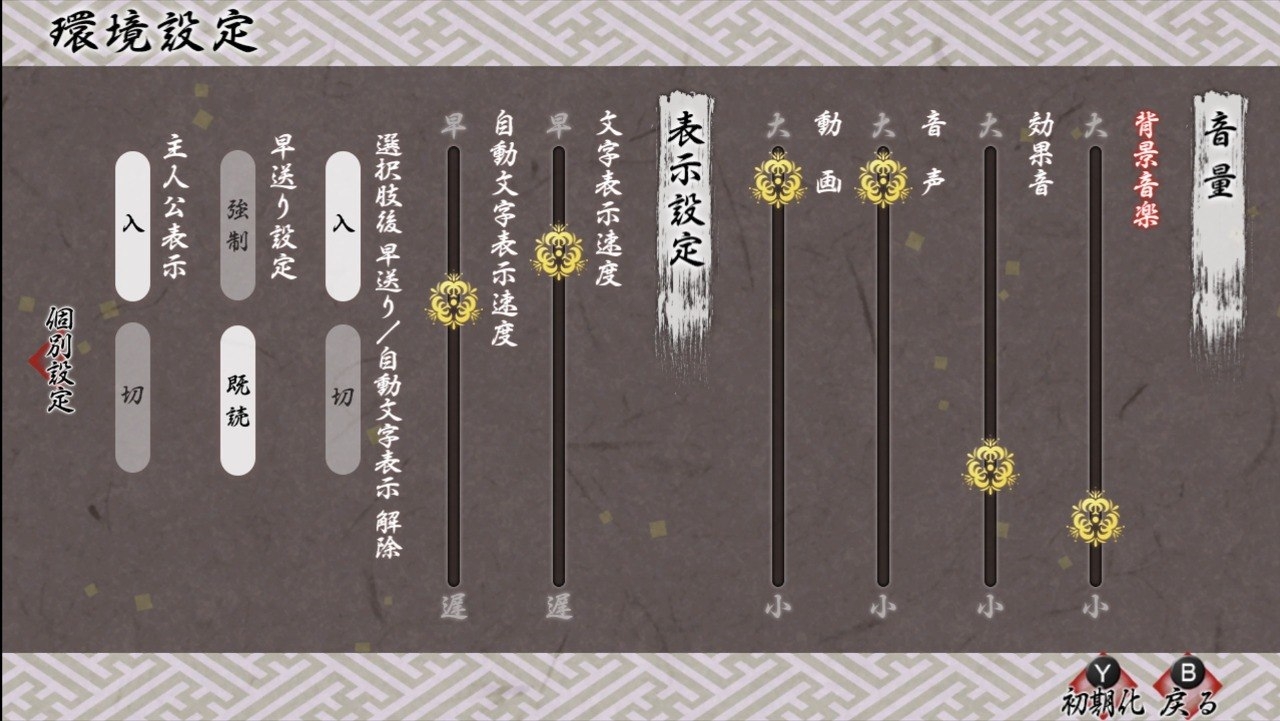
Do you usually leave default settings alone, or is there something you always tweak?

As a player with earphones in my 99% time, I almost always turn the BGM/SE down first in every game.
Usually I only have to lower by 1-2, sometimes 3. But here's the most extreme case I ever had, and it literally just went from 100% to above mute. still a bit too loud 🤣🤣
1000048371.jpg


What's your preference or is there any options you wish every game included?
 
+1 to changing text to appear instantly. I also always turn on "skip after choices", because if someone tries to skip why should they stop after a choice? It will stop on unread text anyway, why does it even exist. And turn down BGS, but in recent games developers finally grasped sound balance, so often it's already turned down by default
 
The only thing I change is the speed of the text; normally, I have a habit of reading super fast, and it's easier for me, especially if it's a game that doesn't have character voices.
 
I usually turn down the background music slightly.
And I change the text speed to the fastest setting.
Because I am quite impatient, I can't read slowly lol.
So I always change these settings before starting any game.
 
I also agree the bgm tends to be too loud for me I turn it down so I can hear the voices more clearly. And I like to mute SE. If there is option to increase voices I will do that too.
 
Oh yeah! Instant text, definitely! I used it for a while, but ended up slowing it down because auto mode would fly through the MC's lines and narration.

Like this
[───────────────gorgeous voiceline───────────────]+[1.5s pause]
[instanttext]+[1.5s pause]

Maybe I'm the odd one out for using auto & manual together 🥹 still looking for the sweet spot of that settings.
 
Maybe I'm the odd one out for using auto & manual together 🥹 still looking for the sweet spot of that settings.
Wait this is so real... Σ(>Д<) I'm the type of person who always changes the settings because I can't for the life of me find a middle ground lol. Auto mode is either too slow or too fast, and manual mode tires my fingers cause I read too quickly. Now I just use them both interchangeably. Insta text is so helpful to me that I enable it if it is ever an option.

I usually keep the other settings at default, but some games I needed to lower the BGM and make the voices louder. If it strain my ears to listen to one line, I change it on the spot haha,,
 
Usually the BGM and text speed. Default text speed is wayyy too slow for me lol
Games will have the BGM quite loud, so it gets hard to hear the voiced lines properly. Sound effects are also pretty loud most of the time ;b

Besides that, I always turn on keep skipping after choices! I get that it gets turned off for new lines, but after the 1~3 new lines of text I need to keep turning it on lol as long you don't enable skip unread, you won't really lose any new interactions... I really don't get why the option is the default one
 
+1 to making BGM a bit lower! sometimes it's too loud and distracting. i also always change the text speed to maximum, it's waay more comfortable for me to see the full sentence right away and i'm not patient enough to wait for the text appear at a slower speed xd
 
  • Like
Reactions: ninnikuryona
Absolutely not, I like to change a bit of everything except for the individual character voice sliders–I have yet to find a seiyuu that doesn't do a good job for their character.

I like to turn down the BGM to around 30~40%, and the SFX to around 70~80%. The balance of the BGM and SFX is sooo off. :boys2_shy: I wish it could be like Discord (haha), where you can adjust volume to over 200% so that on base, BGM is a lot quieter.

I like to change the text speed as well. I usually try to time it to the speed at which characters talk. It just feels more natural that way (and also so that I can read with the character's speech, rather than read too quickly ahead). Auto speed is also really important, I usually just set it to almost the fastest setting.
 
  • Love
Reactions: ninnikuryona
Absolutely! It depends from game to game; sometimes voices are too low, sometimes BGM is, sometimes the SFX are crazy loud, etc! I like it when there's sliders for every character's voice, actually, I find that sometimes the balancing for some is a little... off? So I adjust accordingly!
 
  • Like
Reactions: ninnikuryona
usually the first thing i do when starting a new vn is set bgm to ~40%, sfx to ~60% and voices to 100%! if the bgm is still too loud, i can set it lower, along with sfx. i dont wanna get jumpscared by a sudden loud noise xd bonus points for vns that have the "lower bgm during voicelines" option! it really adds to the atmosphere!!
also, some vns have great discrepancy between characters voices, even if they are set to the same volume. in that case, tweaking some of them is a must too.. but then you need to find the perfect balance between loud voices, quiet voices, and bgm... which turns into you spending more time messing around with settings than actually reading..... especially if you are pretty sensitive to noises in general T_T........ (dramatic)

and also i set the text speed pretty high, like to 85-90%. im not a fast reader, if anything id consider myself to be on the slower side, but when text appears slowly and drags on, its so distracting!!ww so id prefer the text to appear semi-instantly. not instantly though, because this somehow is even more distracting.. or something......
 
  • Like
Reactions: fr4pp3cinn