- Feb 2, 2026
- 196
- 163
HI to you all, I come with Tutorial how emulate Otome games on Your PC With rjubing
you also need 7zip or winrar for this tutorial
1. First we need to downolad emulator
ryubing- https://git.ryujinx.app/ryubing/ryujinx/-/releases
for windows you downolad -
ryujinx-1.3.3-win_x64.zip
for linux -
ryujinx-1.3.3-x64.AppImage
now we have Emulator so what now? we need firmware and prod keys. so
2. Prodkeys and firmware
Link for firmware - https://github.com/THZoria/NX_Firmware/releases/download/21.0.0/Firmware.21.0.0.zip
link for prodkeys for ryubing - https://files.prodkeys.net/Prodkeys.NET_v21-0-0.zip
ok now we have emulator and prod keys & firmware so we can instal it
so
Right-click on the desktop and create a new folder on the desktop. Move the zip file with the emulator, product keys, and firmware you downloaded to this newly created folder on the desktop. Open the new folder, then right-click on the zip file with the emulator and select the option you need, depending on which program you are using. you are using, 7zip or winrar, and select extract here.
Now click on the zip file with the prod keys and do the same, i.e., right-click and select "Extract here."
now turn on emulator click on
ryubing -

now you click on particular emulator to enter it right
now we need to instal prod keys and firmware
ryubing tutorial how to instal prodkeys and firmware
first you have taskbar in emulator like this right

then you click on actions instal firmware and then instal firmware zip or xci and you need to find your folder when you have firmware so ( desktop - new folder - you click on zip with firmware open )
and you wait to install firmware
now you do the same with keys ( actions - instal keys -instal keys (keys.) you fins your folder with keys click on them -open) and then you wait them to instal
now that we have base thing done we need something to play right?
3. How to dump games
so make folder in your avalable disk
For example, you have drive C. Go to drive C in File Explorer, create a new folder, and name it, for example, "Switch games." Just make sure to create it in a place where you will have easy access to it.
now we need emulator have acess to that folder so
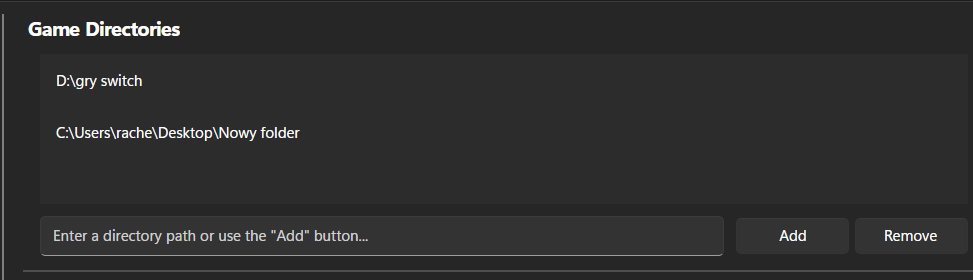
in emulator options- settings - thats my directories for exaple but you add new and you search that folder you created for games now for example you want to downolad temirana
so form downolades former
For example, you have drive C. Open the file explorer on drive C and create a new folder. Name it, for example, "Switch games," but make sure to create it in a place where you will have easy access to it.
Right-click on the file and move it to the folder you created for games, and you'll have it added to Ryubing. When you start the emulator, it will read it automatically.
I recommend playing with an Xbox or PS controller,
but you can also play with the keyboard.
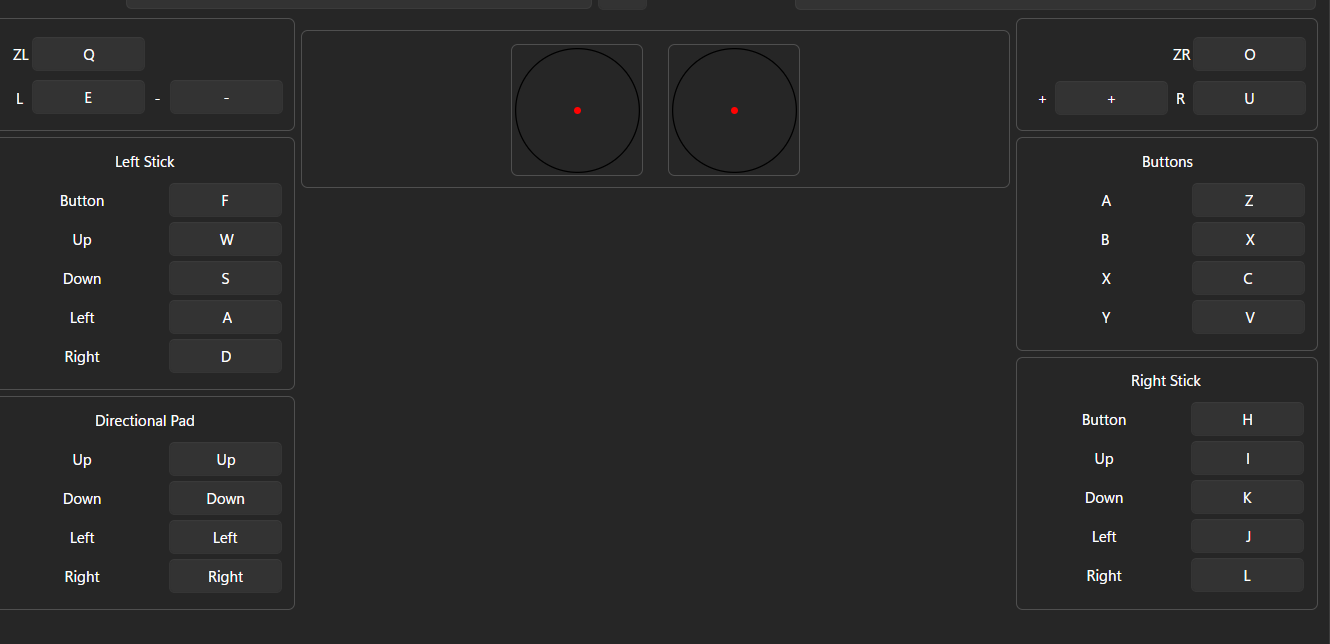
You click options - settings - input and you see all you need, but I will show it here as well.
Ryubing Still working
Eden Working
CITRON DISCONTINUED
YUZU DISCONTINUED
RYUNIX DISCONTINUED
Adding key to eden and eden nightly is Like in My first post
eden - https://git.eden-emu.dev/eden-emu/eden/releases/tag/v0.2.0-rc2
mirror - https://pixeldrain.com/u/tPvTNd1b
eden nightly ( fork wchich works a bit better) - https://pixeldrain.com/u/uWbFF4yJ (my mirror becuase repository vanished becuase dmca)
thats all from me happy playing!
reply to this thread or dm me if you need help
you also need 7zip or winrar for this tutorial
1. First we need to downolad emulator
ryubing- https://git.ryujinx.app/ryubing/ryujinx/-/releases
for windows you downolad -
ryujinx-1.3.3-win_x64.zip
for linux -
ryujinx-1.3.3-x64.AppImage
now we have Emulator so what now? we need firmware and prod keys. so
2. Prodkeys and firmware
Link for firmware - https://github.com/THZoria/NX_Firmware/releases/download/21.0.0/Firmware.21.0.0.zip
link for prodkeys for ryubing - https://files.prodkeys.net/Prodkeys.NET_v21-0-0.zip
ok now we have emulator and prod keys & firmware so we can instal it
so
Right-click on the desktop and create a new folder on the desktop. Move the zip file with the emulator, product keys, and firmware you downloaded to this newly created folder on the desktop. Open the new folder, then right-click on the zip file with the emulator and select the option you need, depending on which program you are using. you are using, 7zip or winrar, and select extract here.
Now click on the zip file with the prod keys and do the same, i.e., right-click and select "Extract here."
now turn on emulator click on
ryubing -
now you click on particular emulator to enter it right
now we need to instal prod keys and firmware
ryubing tutorial how to instal prodkeys and firmware
first you have taskbar in emulator like this right
then you click on actions instal firmware and then instal firmware zip or xci and you need to find your folder when you have firmware so ( desktop - new folder - you click on zip with firmware open )
and you wait to install firmware
now you do the same with keys ( actions - instal keys -instal keys (keys.) you fins your folder with keys click on them -open) and then you wait them to instal
now that we have base thing done we need something to play right?
3. How to dump games
so make folder in your avalable disk
For example, you have drive C. Go to drive C in File Explorer, create a new folder, and name it, for example, "Switch games." Just make sure to create it in a place where you will have easy access to it.
now we need emulator have acess to that folder so
in emulator options- settings - thats my directories for exaple but you add new and you search that folder you created for games now for example you want to downolad temirana
so form downolades former
For example, you have drive C. Open the file explorer on drive C and create a new folder. Name it, for example, "Switch games," but make sure to create it in a place where you will have easy access to it.
Right-click on the file and move it to the folder you created for games, and you'll have it added to Ryubing. When you start the emulator, it will read it automatically.
I recommend playing with an Xbox or PS controller,
but you can also play with the keyboard.
You click options - settings - input and you see all you need, but I will show it here as well.
Ryubing Still working
Eden Working
CITRON DISCONTINUED
YUZU DISCONTINUED
RYUNIX DISCONTINUED
Adding key to eden and eden nightly is Like in My first post
eden - https://git.eden-emu.dev/eden-emu/eden/releases/tag/v0.2.0-rc2
mirror - https://pixeldrain.com/u/tPvTNd1b
eden nightly ( fork wchich works a bit better) - https://pixeldrain.com/u/uWbFF4yJ (my mirror becuase repository vanished becuase dmca)
thats all from me happy playing!
reply to this thread or dm me if you need help
Last edited: