
Install the app
How to install the app on iOS

Follow along with the video below to see how to install our site as a web app on your home screen.

Note: This feature may not be available in some browsers.

[fixed] Error when trying to save or close VN

burnmybread

Member
Distinguished
Dec 6, 2022
149
23
Visual Novel: 売淫令嬢 ~周防院櫻子の罪穢~
Whenever I try to save my progress or even close this vn, the same error pop-up appear, and I can't close or save

game message:
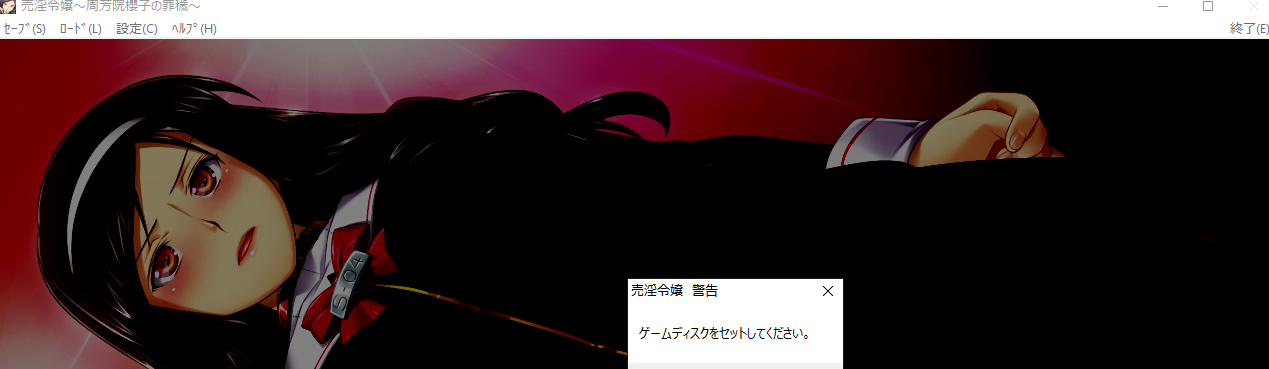
1779849398546.png


I've already tried using local emulator and played with the ISO mounted on the disk drive, and nothing worked.

System: Windows 10 Pro 22H2
 
I found the remark to "Copy "THelp.dat" to game directory for dummycut."

but I couldn't find that file (or a similarly named file for that matter) on the iso image.

So the problem seems to be with the Dummycut.


To confirm, I tested the full-sized version from the same thread (the 3-part download above the dummycut) and that didn't show any error when saving/exiting.


So unless someone else chimes in and has a fix, I'd just ditch the dummycut and use the normal one.


Edit:

After comparing the dummycut with the normal version I found that the full-sized one indeed does copy a "THelp.dat" to the installdir.
When that file is copied over to a dummycut install, it doesn't show the error anymore.

So the fix is to simply copy that file to the install directory.

Here's the file: https://pixeldrain.com/u/rA2oiUaF
 
Last edited:
  • Like
Reactions: burnmybread
I found the remark to "Copy "THelp.dat" to game directory for dummycut."

but I couldn't find that file (or a similarly named file for that matter) on the iso image.

So the problem seems to be with the Dummycut.


To confirm, I tested the full-sized version from the same thread (the 3-part download above the dummycut) and that didn't show any error when saving/exiting.


So unless someone else chimes in and has a fix, I'd just ditch the dummycut and use the normal one.


Edit:

After comparing the dummycut with the normal version I found that the full-sized one indeed does copy a "THelp.dat" to the installdir.
When that file is copied over to a dummycut install, it doesn't show the error anymore.

So the fix is to simply copy that file to the install directory.

Here's the file: https://pixeldrain.com/u/rA2oiUaF

Dude, you're a genius, it worked here, thanks!